
This is the quick guide to our free budget planner. Follow it top to bottom once, and you'll have a working budget plus a payday plan that tells you exactly where every check goes.
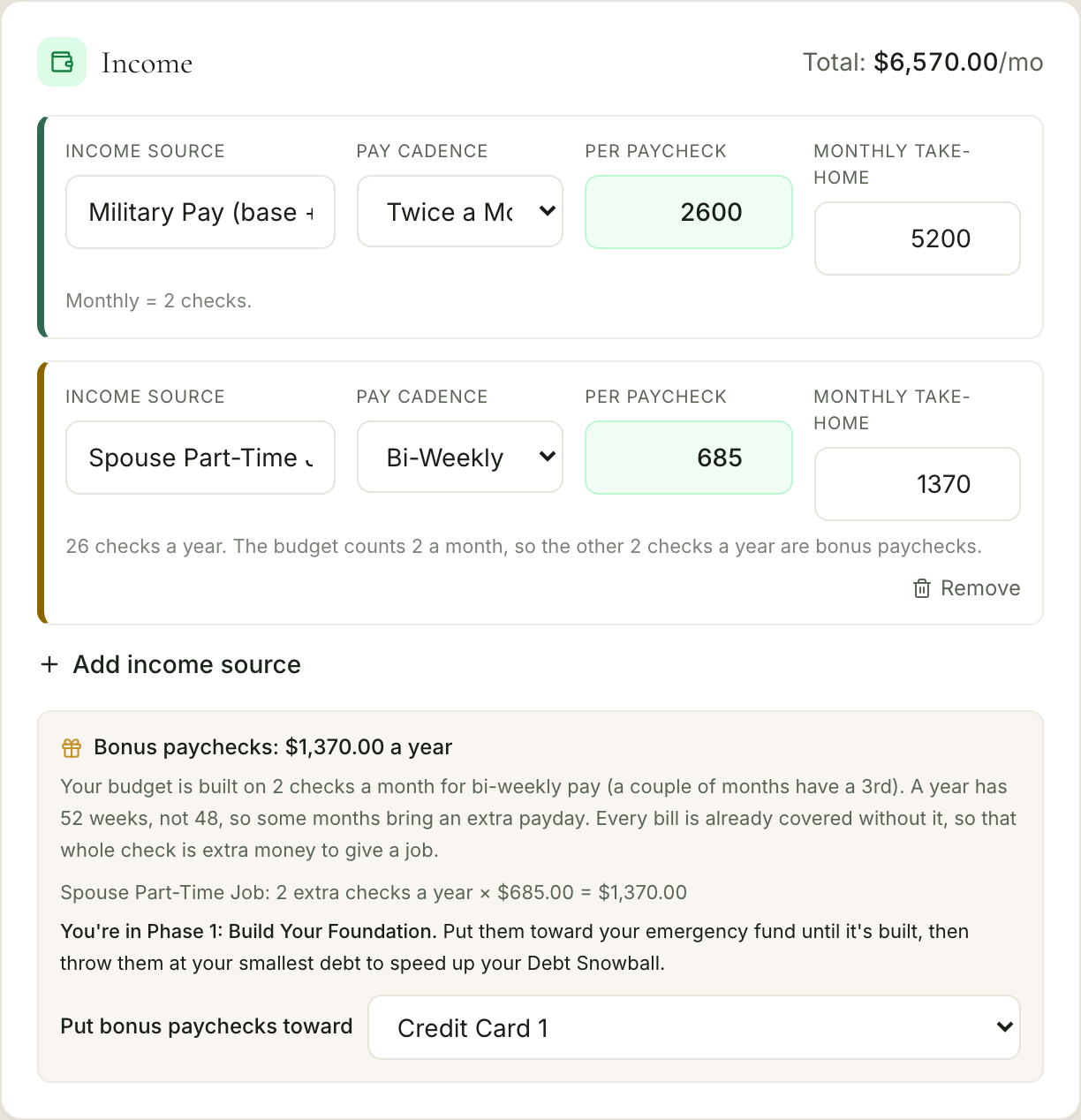
The screenshots use a made-up military family: one service member paid twice a month, and a spouse with a part-time job paid every other week.
Four ideas run through every step:
- Every dollar gets a job. You tell your money what to do instead of letting your money (or your debt) tell you.
- Know what to set aside from each paycheck for every line, so the bills are covered before they're due.
- Give it three months. Month one you figure it out, month two you adjust a lot, month three it starts to feel easy.
- Bucket your money so you can't accidentally spend the rent on chips at the grocery store.
Step 1: How do I add my income?
Open the Budget page and start with the Income card. Add one line per paycheck source. For each one, pick how often it's paid and type the take-home amount of one check (what actually hits your bank account). The planner works out the monthly figure for you.
A few tips:
- Military pay: count base pay, BAH and BAS together as one income. Our military paycheck guide explains why.
- Two incomes? Click Add income source for the second one, as we did for the spouse's job above.
- Weekly or bi-weekly pay: the budget only counts the checks you get every month (4 weekly, 2 bi-weekly). The extra checks a few months a year are bonus paychecks. Choose where they go in the box at the bottom. In Phase 1, that's your emergency fund until it's built, then your smallest debt.
Step 2: What does "Remaining" mean?
The bar at the top stays on screen as you scroll. Remaining is income you haven't given a job yet. Right now, all $6,570 is sitting there unassigned.

Your goal is to get Remaining to exactly $0.00. That's a zero-dollar budget. It doesn't mean you spend everything. Savings, extra debt payments and fun money are all jobs. The point is that every dollar has one, decided on purpose, before the month starts.
Step 3: How do I fill in the budget lines?
Open each section and type a monthly amount on every line that applies to you. Work in this order: giving, bills and housing, food and gas, then fun money, debt and savings with what's left.
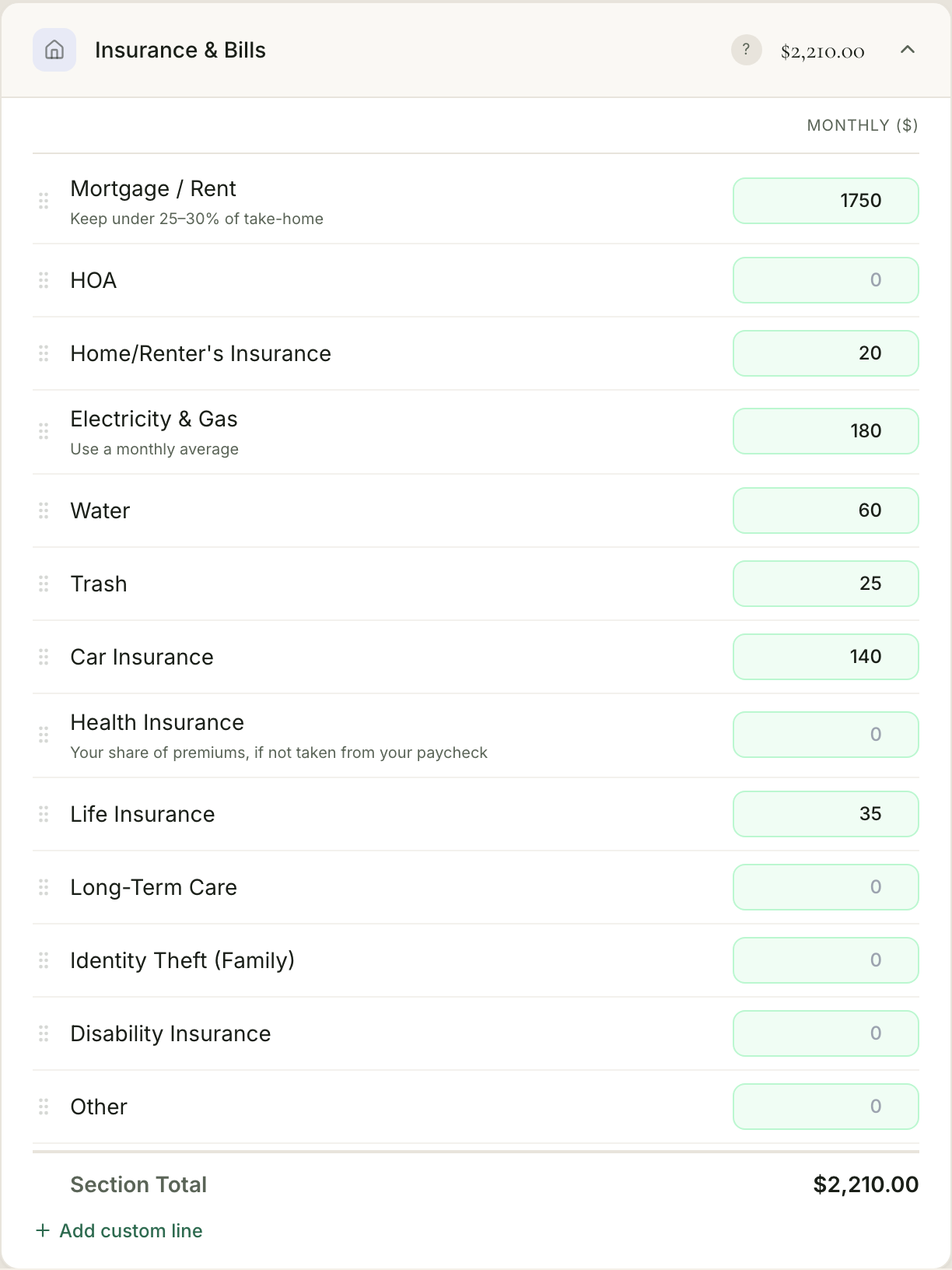
- Housing should stay at 25–30% of take-home pay. Here, $1,750 on $6,570 is about 27%.
- Bills that don't come monthly (car registration, Christmas, a trip home) still get a monthly line. Divide the yearly cost by 12 and save toward it.
- Fun money for each spouse. A budget with no breathing room won't last. If you're in debt, you will likely need to cut this out of the budget until you're out of debt. This is not an allowance, it's an opportunity for spouses to spend money without feeling guilty or needing to add it to a budget. It's some freedom.
- Rename, hide or add lines to match your life. Don't put anything sensitive in a line name.
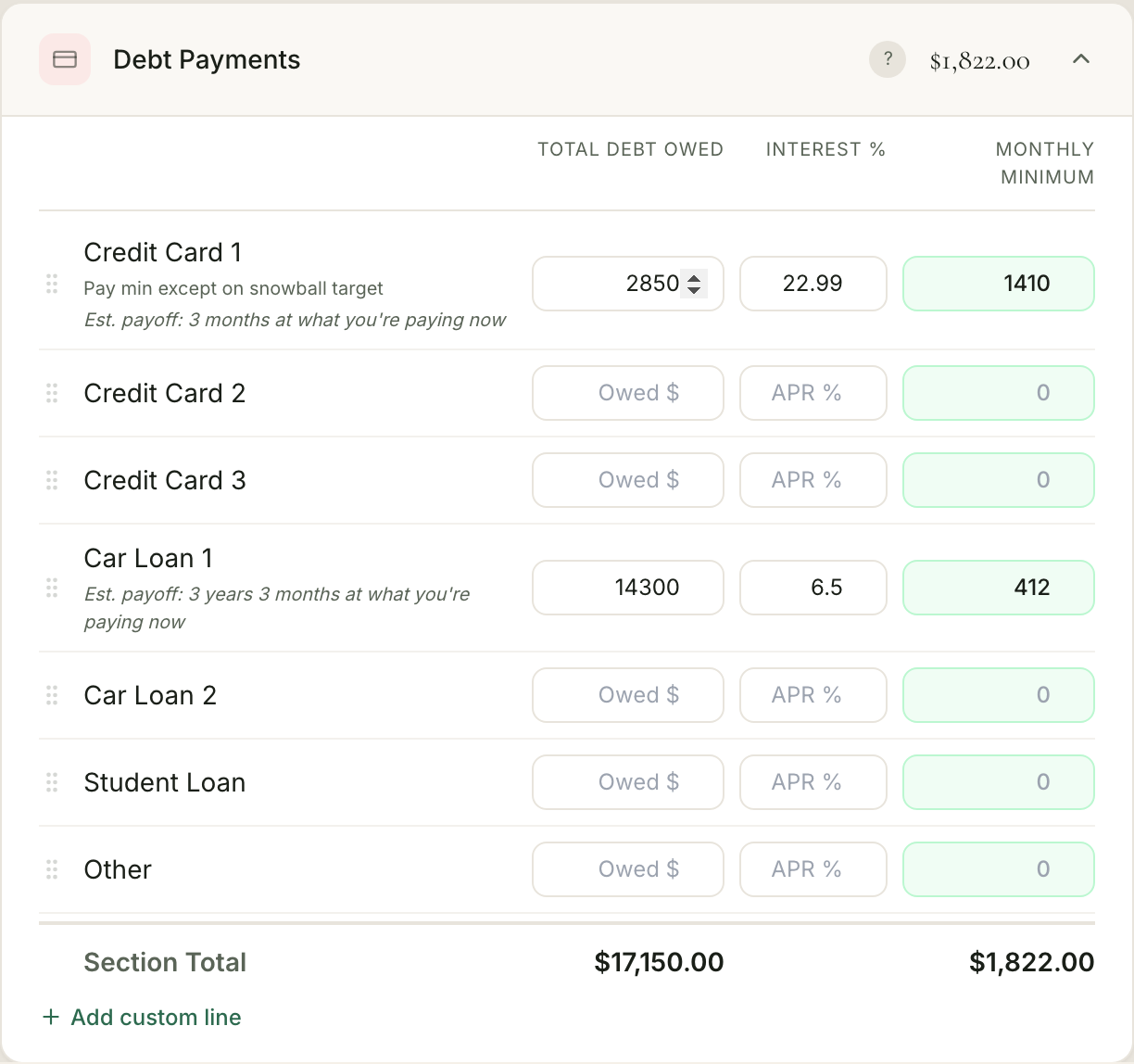
For Debt Payments, enter what you owe, the interest rate and what you'll pay this month. The planner estimates how long each debt will take to pay off. Pay minimums on everything and put every extra dollar on the smallest balance (the Debt Snowball).
Step 4: How do I know when my budget is done?
When Remaining hits $0.00, the bar turns full and says so. If it goes red, you're spending more than you earn. Trim a line or find more income until it's back to zero (when you "trim a line" it doesn't just mean delete it from your budget, you need to cancel it in real life...).

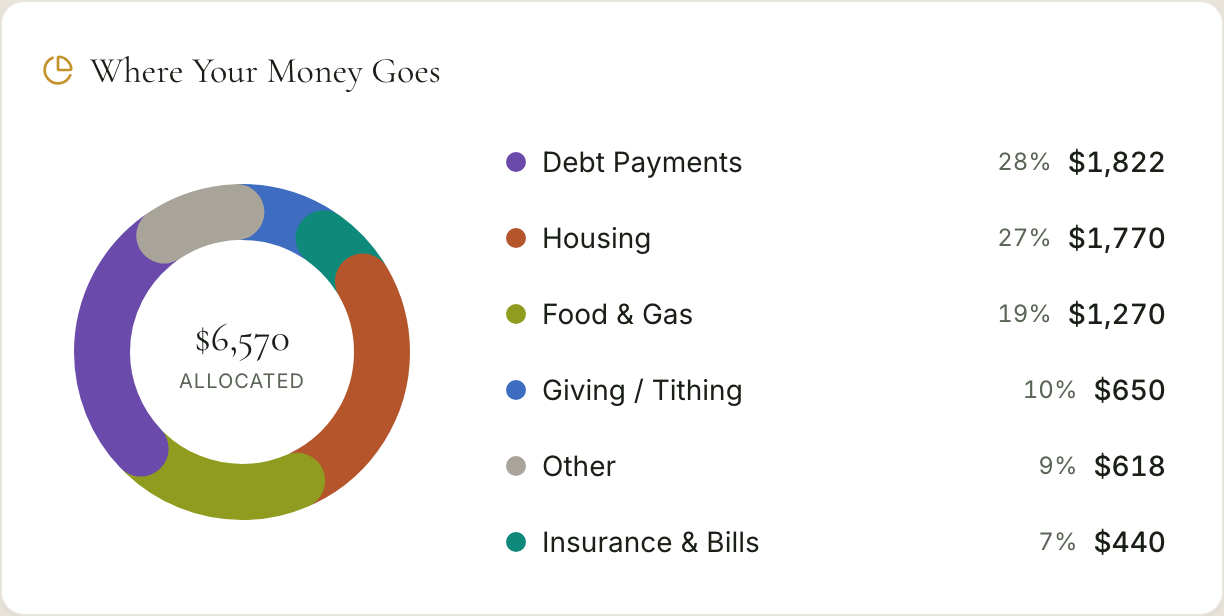
The Where Your Money Goes chart is a quick gut check. If debt payments are your biggest slice, that's money that could be yours once the debt is gone.
Step 5: Splitting your money into separate accounts (and why you should).
Because one big checking account makes every dollar look available. If rent money and grocery money sit in the same place, it's easy to spend the rent on snacks without noticing until the 1st.
Separate buckets fix that. My wife and I use one for bills, one for food and gas, a fun-money account for each of us, and savings funds for things like the next car or a house. This means multiple savings/checking accounts that we both have access to.
Scroll to Set up your accounts and who pays what. Add your accounts (bank accounts or cash), then pick whose paycheck fills each one.
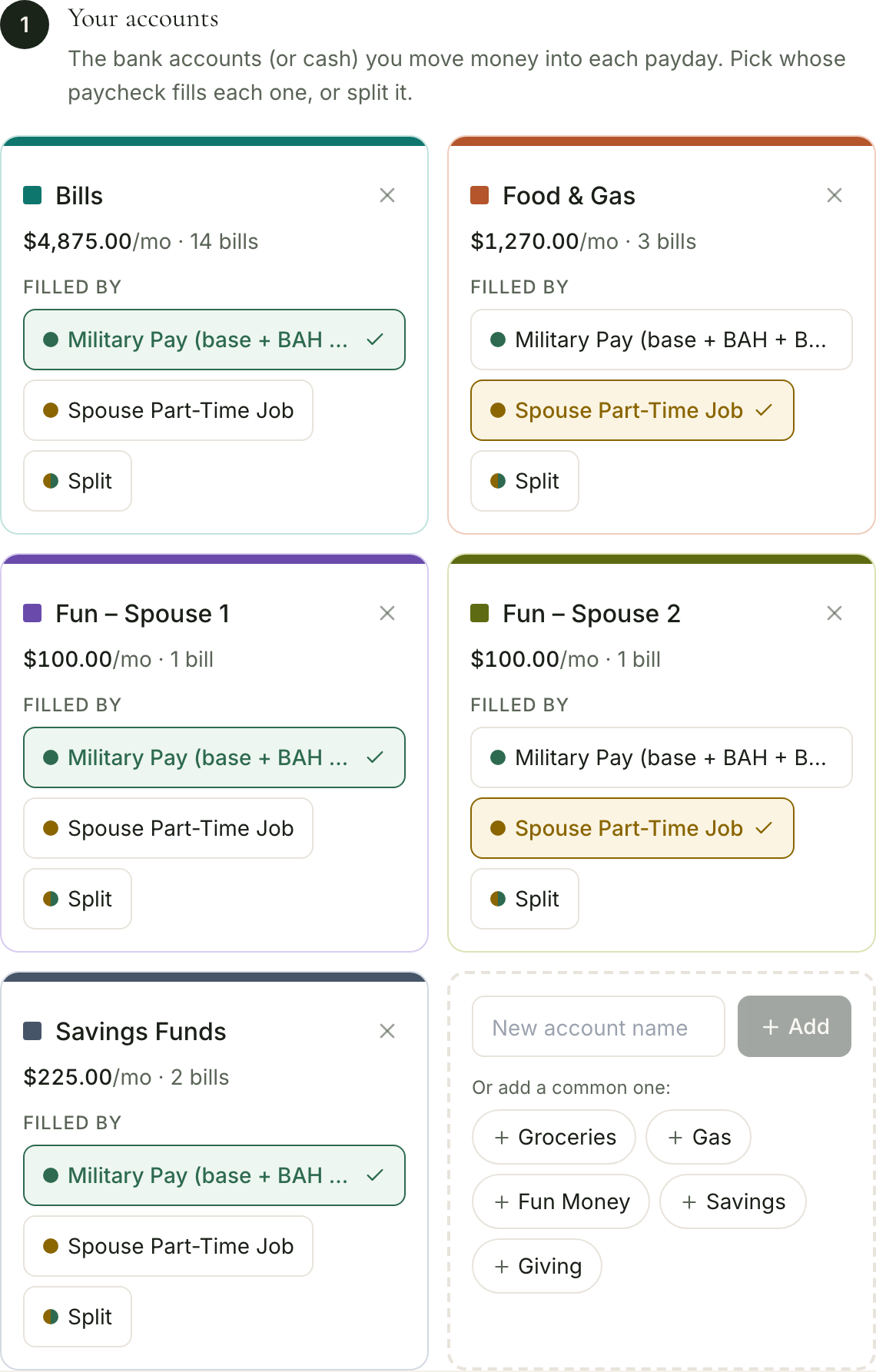
Then put each budget line in the account it comes out of. Move all to… fills a whole section at once.
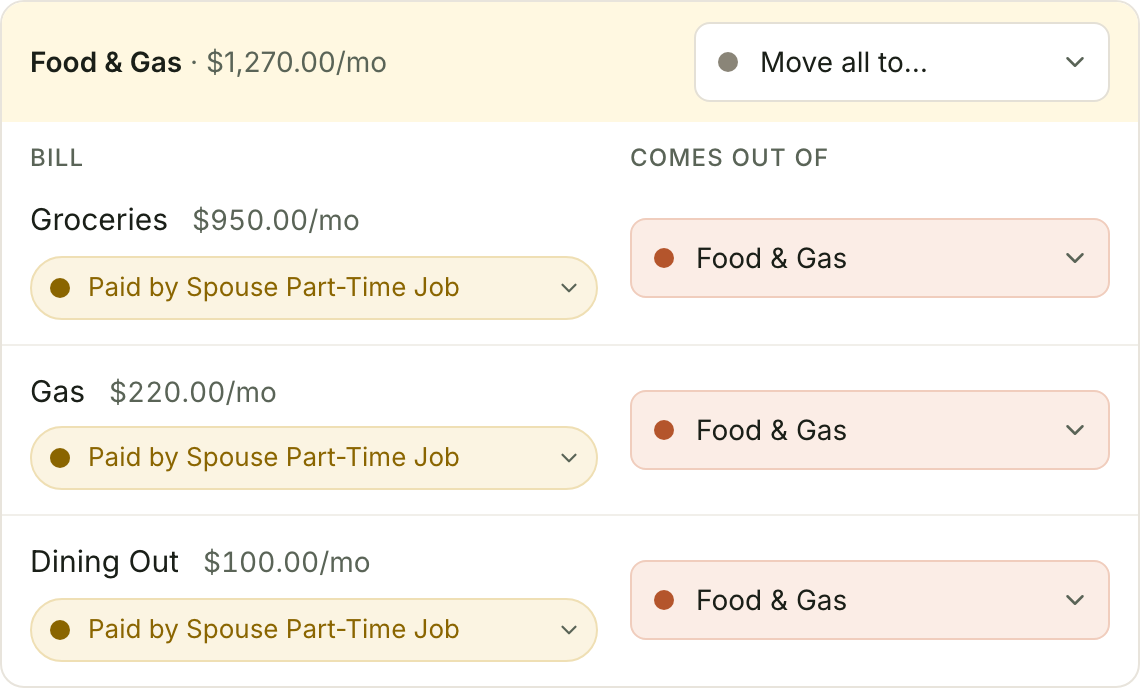
When the grocery account runs low, you're done buying groceries for now. The rent is still safe in Bills.
Step 6: How much of each paycheck goes where?
The Paycheck Plan shows what to move into each account every time a check lands.
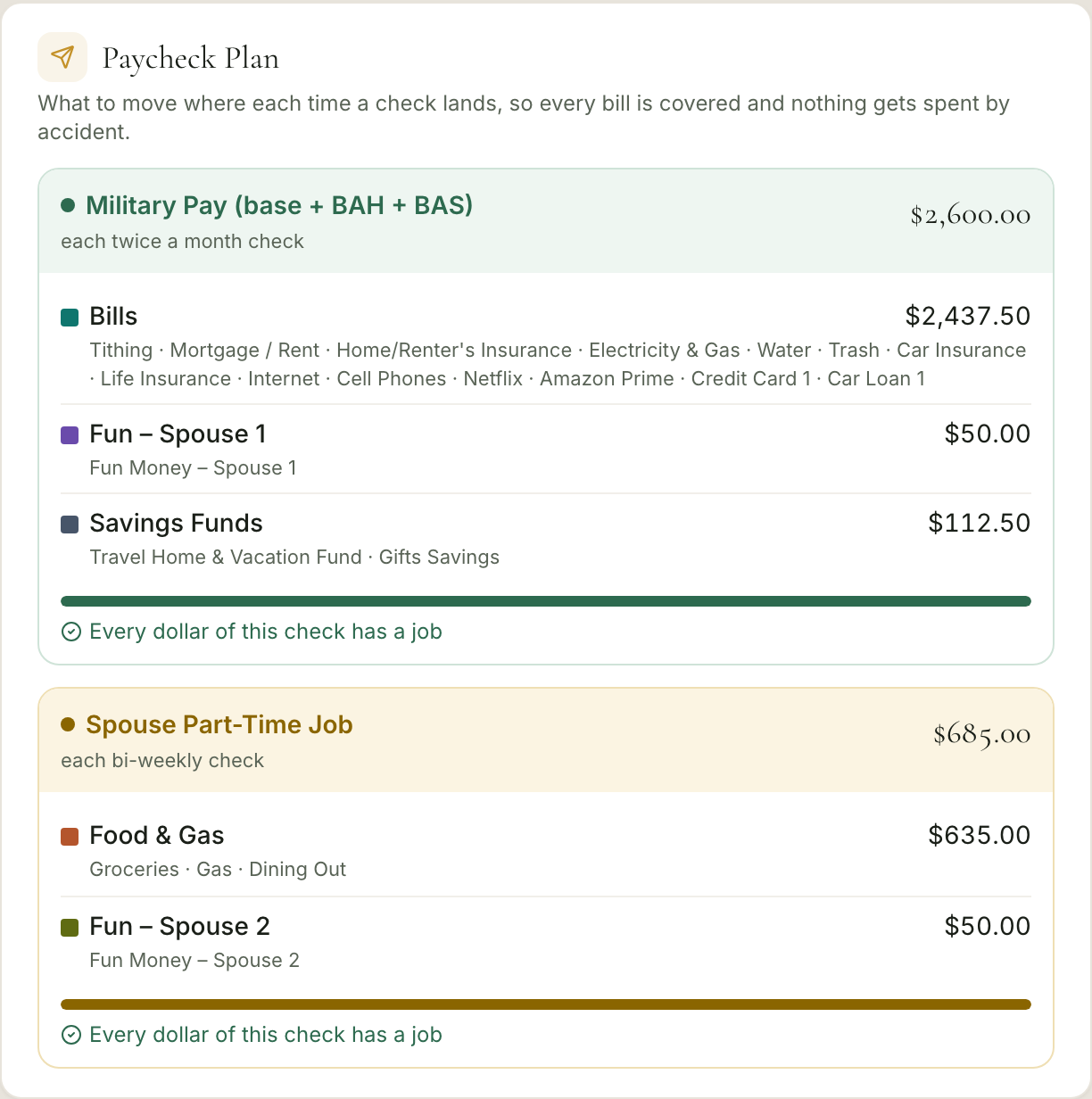
In this example, every military paycheck sends $2,437.50 to Bills, $50 to fun money and $112.50 to savings. Every spouse paycheck sends $635 to Food & Gas and $50 to fun money. Each card shows "Every dollar of this check has a job" when it's fully assigned.
Do these transfers on payday, every payday. Each check puts away its share of every bill, so when the rent is due the money is already sitting in Bills. (In your first month, you may need a small cushion to cover a big bill that's due before you've saved its full amount.)
Step 7: What happens next month?
On the first visit of a new month, the planner copies last month's budget forward, so you start from what you had instead of a blank page. Update what changed, check that Remaining is still $0.00, and you're set. It saves as you type.
If you're married, click Share with partner (at the top of the page) so you're both working from the same budget.
How long does it take to get a budget right?
About three months. Habits take time: in one well-known study, it took people a median of 66 days to make a new daily behavior automatic, and anywhere from 18 to 254 days depending on the person (Lally et al., 2010). A budget is a habit too, so expect it to take a few months.
- Month one: figuring it out. Half your numbers are guesses, and some will be wrong.
- Month two: lots of adjusting. You move money between lines based on what really happened.
- Month three: smoother sailing. Fewer changes, and the habit is built.
When my wife and I started, I was hyper-focused on the budget and stressed every time we went over a number. There was no flexibility built in. We never fought about not having enough money. We stressed about going $20 over on groceries, and that shouldn't be the case. The first few months are meant to flex while you figure out your real numbers. Go over? Move money from another line, adjust next month's number, and keep going.
Common questions
Is the budget planner free? Yes. Create a free account and the planner is on your dashboard.
Can my coach see my budget? Only if you work with a Wealth by Design coach, and only your assigned coach. Your account names stay hidden from them.
What if my income changes every month? Budget on your lowest normal month. When more comes in, give the extra a job right away, the same way you'd use a bonus paycheck.
Can I print it? Yes. Click Print / PDF at the top of the planner.
Want a second set of eyes on your numbers? A Budget Analysis gets you a written review of your budget, no call needed.
AI disclosure: This article was drafted with AI assistance and reviewed, fact-checked, and edited by Wealth by Design Financial personnel. We take responsibility for the accuracy and content of the final article.
Ready to take action?
Turn knowledge into results.
A personalized coaching session can cut years off your debt payoff timeline and make every step concrete.